There are moments when an idea feels urgent — a small app, a feature, a proof of concept that must exist now. This introduction meets that feeling with a clear path: an AI-assisted practice that turns plain language into working code. Vibe coding reframes the creator’s job: describe outcomes, guide the assistant, refine results.
Coined by Andrej Karpathy in early 2025, the concept matters because models and tools reached a capability threshold. For entrepreneurs and product teams, this method speeds prototypes and reduces setup friction for quick web demos and internal tools.
The human stays central — as strategist, reviewer, and owner. Readers will see practical steps, prompt patterns, and tool choices (including a contextual note on vibe coding resources) to move from idea to deployed application while keeping control.
Key Takeaways
- Vibe coding turns natural language into executable code for fast prototypes.
- The approach lowers barriers for newcomers and boosts output for experienced teams.
- Two modes exist: quick throwaway prototypes and responsible AI-assisted development.
- Humans guide constraints, test results, and ensure quality and safety.
- The article will provide concrete prompts, workflows, and tool recommendations.
Vibe Coding Intro: What it is, why it matters, and who it’s for
Today’s assistants convert plain English goals into runnable code, shrinking prototype time from weeks to hours.
The core concept is simple: express intent, generate a first pass of an app, run it, then refine. This process moves teams from prompt to production in tight loops.
Two operational modes exist. Pure vibes let teams accept AI output for quick throwaway demos. Responsible AI-assisted development treats the assistant as a collaborator—adding reviews, tests, and security checks.
Who benefits? Developers seeking leverage, product leaders validating ideas, and non-specialists assembling a functional prototype with human oversight.
From prompts to production: the core concept
LLM-driven models translate prompts into structure, suggest libraries, and accept follow-ups to improve UX and logic. Clear requirements and contextual knowledge yield better results.
| Mode | Speed | Risk | Best use |
|---|---|---|---|
| Pure vibes | Minutes–hours | Higher (no review) | Short demos, ideas |
| Responsible AI-assisted | Hours–days | Lower (with tests) | MVPs, internal tools |
| Hybrid | Hours | Medium | Prototype to pilot |
For a practical primer, see vibe coding 101. Treat the approach as a repeatable process: guide the assistant, validate output, and align the application to real user needs.
Vibe coding versus traditional programming: focusing on outcomes over lines of code
Two development paradigms now compete: one values mastery of every line, the other prizes rapid delivery of outcomes.
Traditional programming emphasizes manual syntax, architecture decisions, and step-by-step implementation. Developers write code, control dependencies, and review each change line by line.
Outcome-first workflows ask teams to describe desired app behavior and let an assistant produce the first draft. This can speed prototypes: authentication screens, CRUD endpoints, and basic UI states appear in minutes rather than days.
Role shift: from implementer to guide, tester, and reviewer
Developers move from being sole implementers to guides who steer the assistant, test outputs, and review architecture. They triage suggestions, add constraints, and ensure features match user needs.
Quality depends on feedback. Specific critique and context help the assistant produce idiomatic, maintainable code. Good feedback reduces rework and speeds refinement.
- Faster features: scaffolding and prototypes accelerate validation.
- Trade-offs: fewer hours writing code can mean more time on observability and maintainability.
- Risk management: developers remain responsible for licensing, performance, and security choices.
Teams should pick tools that integrate with CI/CD and code review workflows. For a deeper comparison, see vibe coding vs traditional development.
How vibe coding works in practice: the conversational code loop
Rapid iteration relies on short, clear exchanges that guide code toward a real result.
The loop is simple and repeatable: describe the goal in a prompt, let the assistant generate code, execute it, observe logs and outputs, then give feedback and refine. Repeat until the app meets acceptance criteria.
Describe, generate, execute, refine: the tight iteration cycle
Start with concrete inputs: sample data, expected output, constraints, and what not to use. This reduces drift and improves first-pass accuracy.
Pasting errors and stack traces into the conversation lets the assistant pinpoint causes and propose fixes. Ask for quick unit tests alongside each change to lock behavior and prevent regressions.
Adding error handling, tests, and feedback to harden your code
Introduce early error handling for FileNotFoundError, PermissionError, and invalid input. Small guards avoid brittle behavior when real users and data appear.
| Step | Action | Goal | Example |
|---|---|---|---|
| Describe | Provide prompt with inputs | Clear first draft | Form fields, data types |
| Generate | Produce runnable code | Executable prototype | Endpoint + UI |
| Execute | Run, collect logs | Observe failures | Tracebacks, console |
| Refine | Give feedback & tests | Stabilize behavior | Unit tests + error handling |
Tip: Be explicit about what worked, what failed, and the next change. For patterns and design notes, see a deeper guide at design principles that make code feel.
From idea to live app: the vibe-coded application lifecycle
A practical lifecycle turns a single idea into a small, testable application ready for the web. Start in a design-first mode: capture the core idea, define the primary user flow, and pick the minimum features that prove value. This keeps work focused and reduces wasted effort.
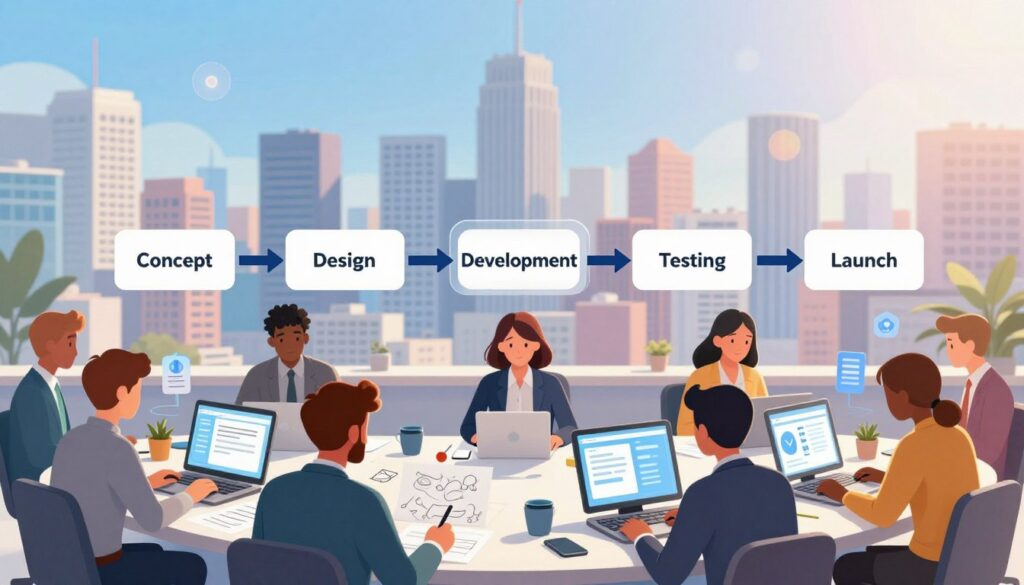
Ideation and blueprinting to generation and refinement
Begin with a single high-level prompt in Google AI Studio or Firebase Studio. Let the model generate UI, backend, and file structure. In Firebase Studio, review the AI’s blueprint: features, stack, and styling choices.
Keep changes structured: record each refinement, note expected behavior, and tag a version. That traceability helps when rolling back or auditing decisions.
Testing, validation, and secure deployment to the web
Introduce human testing early. Add simple unit tests, form validation, and access checks as the application grows. Plan seed data, migrations, and privacy controls before production use.
- Deploy: publish to Cloud Run for a shareable, scalable URL.
- Secure: store environment variables safely and avoid leaking secrets.
- Document: explain why specific models, libraries, or tools were chosen.
Ship a thin, shippable slice first. Iterate with user-centric prompts so the assistant’s suggestions align to real usage and keep the application maintainable.
Get started fast: tools, apps, and environments to try today
A short experiment with the right tools shows how an assistant can turn a prompt into a working app. Pick one small feature and focus on input and output. That clarity speeds learning and reduces risk.
Google AI Studio: single-prompt web apps and Cloud Run deploys
Google AI Studio builds shareable apps from one clear prompt. Enter requirements, view a live preview, then deploy to Cloud Run for a public web URL in minutes.
Firebase Studio: app blueprints, prototypes, and publish workflows
Firebase Studio generates a blueprint you can approve, refine, and publish. It’s designed for production-ready flows: prototypes become a public application with CI-friendly artifacts and secure environment handling.
Gemini Code Assist in your IDE: generate, improve, and test in-line
Gemini Code Assist works inside VS Code and JetBrains. Generate functions, refactor existing code, add error handling, and produce unit tests to finish a feature end-to-end.
- Start small: pick one tool and run a basic prompt for a form, dashboard, or simple API.
- Integrate: align generated code with CI/CD and manage environment variables securely.
- Compare ergonomics: preview fidelity, diff views, and test support before you commit to a stack.
These tools lean on modern models and services like Vertex AI and Cloud Run. We recommend one short loop to get started, then scale the application scope as confidence grows in this vibe coding approach.
Hands-on how-to: prompt patterns that help you write code better
Clear templates for requests make assistants deliver predictable, testable code fast.
Be specific: state the input, the desired output, constraints, and any libraries to avoid. Offer a tiny data sample so the assistant can produce realistic results.
Build in small chunks. Add one feature per change, run tests, then tag a version before the next change. Small steps keep each line of code reviewable and reduce regressions.
Share exact errors and failing tests. Paste stack traces, logs, and the failing input so the assistant can diagnose root causes quickly. Ask for suggested fixes and short unit tests.
- Request explicit error handling for common failures: missing files, invalid input, permission errors.
- Ask for diffs and brief explanations so you see what changed and why.
- Keep a running changelog: date, version, changes, and feedback entries.
Final tip: treat the interaction as a conversation—acknowledge what worked, give precise feedback, and state the next small objective to continue improving the code.
Quality, security, and debugging: make sure users and data stay safe
Strong review gates and clear tests keep rapid prototypes from becoming risky products. Human oversight is mandatory: peer reviews, unit and integration tests, and automated scanning reduce defects before users interact with the application.
Security must be baked in early. Use secret management, dependency scanning, and least-privilege policies so data and user flows remain protected. Document threat models and data paths so reviewers can spot issues fast.
Human-in-the-loop reviews, tests, and code scanning
Require a human sign-off for any generated code that touches user data or auth. Pair manual review with CI-based static analysis and dependency checks. These controls catch license, vulnerability, and logic errors.
“Automated suggestions speed development, but verification keeps users safe.”
- Enforce linters and formatters to keep code consistent.
- Add unit and integration tests that assert safe defaults and error handling.
- Run dependency and secret scans in each pipeline run.
Common pitfalls: brittle structure, maintainability, and performance
AI-generated code can be inconsistent. Without clear boundaries, modules turn monolithic and hard to debug. Make sure to request refactors and small, testable features.
Watch performance early: profile for N+1 queries, blocking I/O, and wasted network calls. Set SLAs for key user-facing features and measure against them.
| Risk | Mitigation | Action |
|---|---|---|
| Security gaps | Dependency scanning & secrets management | Auto-scan + rotate secrets, enforce least privilege |
| Debugging complexity | Structured logging & tests | Log traces, add unit tests for edge cases |
| Maintainability | Policy enforcement & refactors | Linters, codeowners, scheduled refactor sprints |
| Performance regressions | Profiling & SLAs | Benchmark critical paths and remediate hotspots |
Operational hygiene matters: keep separate dev, stage, and prod environments with locked configs and rollback plans. Error handling and safe defaults should be everywhere and covered by tests that simulate failures.
For a practical checklist on secure development practices and review patterns, consult this secure development guide.
When vibe coding shines—and where it struggles
When teams need answers quickly, AI-assisted drafts can reveal which ideas deserve follow-up.
Best-fit projects include early-stage MVPs, hackathon demos, internal utilities, and proofs-of-concept. These projects prioritize speed and learning over perfect architecture.
In this way, teams get fast drafts of app scaffolds, pages, and endpoints. That speed helps validate the problem and decide whether to keep investing in the project.
Where it excels
- Rapid prototyping: produce runnable code to test an idea within hours.
- Creative exploration: explore multiple ideas and UX directions with low cost.
- MVPs and proofs: build minimal app slices that prove user value fast.
Where it struggles
Complex architectures, distributed systems, and strict compliance still demand careful programming and architecture work.
AI drafts can drift as scope grows; without tests and refactors, code quality and performance suffer. Developers should frame changes as small, testable increments so each project milestone remains shippable.
- Pick tools that support collaboration, code review, and observability to reduce risk.
- Use a mixed strategy: let AI handle routine pieces while engineers own core logic and critical paths.
- Use the approach to illuminate unknowns—explore ideas quickly, then harden the application once direction is validated.
“Use fast experiments to learn, then apply rigorous engineering to scale and protect users.”
Conclusion
The real benefit lies in shrinking the path from a line of thought to a deployed application while keeping humans in control. Describe intent, generate code quickly, then refine with tests and reviews. This approach speeds building features without skipping safety.
Start pragmatically: pick one small app slice, get started with a single prompt, and evaluate results critically. Iterate in short loops and document each decision.
Humans remain the reviewers, architects, and stewards of user outcomes; the assistant accelerates, not replaces, expertise. For a practical primer, see the vibe coding guide.
Next step: choose a tool, outline a minimal feature, ship a working version, and harden it with tests and automation.
FAQ
What is vibe coding and who is it for?
Vibe coding is a prompt-driven, conversational approach that moves development from writing every line to guiding models and tools to generate working features. It suits entrepreneurs, product teams, and developers who want faster prototyping, clearer requirements, and a human-in-the-loop workflow for building web apps and tools.
How does the prompt-to-production concept work?
The core idea is simple: describe the desired behaviour, provide inputs/outputs and constraints, ask for code or artifacts, run them, and iterate. This loop—describe, generate, execute, refine—shortens the feedback cycle and prioritizes outcomes over boilerplate lines of code.
Is vibe coding just using AI to write code for you?
Not exactly. It blends AI assistance with developer oversight. The practitioner shifts from sole implementer to guide, tester, reviewer, and maintainer—ensuring generated code meets requirements, security standards, and production quality.
How do teams add error handling and tests when using this approach?
Teams build tests and error handling into prompts and the iteration cycle: request unit tests, input validation, and explicit failure modes; run generated code; share logs and stack traces; then refine. This creates a hardened output through repeated, human-reviewed passes.
What does the application lifecycle look like with vibe-coded projects?
It starts with ideation and blueprinting, moves to generation and rapid refinement, then integrates testing, validation, and secure deployment. The loop repeats post-deploy for monitoring, bug fixes, and feature updates—accelerating time-to-MVP.
What tools and environments work best to get started quickly?
Modern IDE extensions and cloud tooling accelerate adoption: Google AI Studio for single-prompt web apps and Cloud Run deploys, Firebase Studio for app blueprints and publishing, and in-IDE assistants like Gemini Code Assist for inline generation, improvement, and testing.
What prompt patterns reliably produce better code?
Be specific: list inputs, outputs, constraints, and “do not use” items. Break work into small chunks—features or pull-request-sized tasks—and include errors, logs, and desired tests in prompts so the assistant can produce verifiable, debuggable code.
How do you ensure quality, security, and maintainability?
Combine automated scans, unit and integration tests, and human-in-the-loop reviews. Enforce code scanning, dependency checks, and runtime monitoring. Treat generated code like any other asset: document, version, and run continuous validation.
Where does this approach excel and where does it struggle?
It excels at rapid prototyping, MVPs, and creative exploration—delivering features fast with iterative feedback. It struggles with highly complex architectures, distributed systems, and long-term maintenance where deep, domain-specific design and rigorous engineering trade-offs are required.
How should teams incorporate generated code into existing projects?
Integrate in small, reviewed increments: create feature branches, run tests locally and in CI, perform security scans, and document changes. Use prompts to generate tests and migration steps so the integration remains auditable and maintainable.
What common pitfalls should teams avoid?
Avoid brittle structure from copy-pasted code, poor maintainability, and unchecked performance regressions. Do not skip human review, ignore dependency risks, or delay writing tests and error handling—these save time and risk down the line.
How do logs and error messages improve the conversational code loop?
Concrete logs and stack traces turn vague prompts into precise debugging steps. Sharing runtime output lets the assistant suggest targeted fixes, write failing tests, and iterate until the issue is resolved—making the loop efficient and reproducible.
Can vibe coding be used for production-grade applications?
Yes—when paired with strict review, testing, and deployment practices. Generated code can be production-ready if it undergoes human audits, security hardening, performance testing, and continuous monitoring before and after release.