There are days when the code flows and days when every small thing slows you down.
The right setup can make those good days more common. A clear desk and a calm workspace lower friction. They let developers spend more time in deep focus and less on deciding where a cable goes.
This guide describes a practical way to build a focused office at home or in a hybrid office. It covers hardware choices, small design changes, and simple rituals that protect time for coding.
We draw on real examples and proven tips — from choosing one laptop or monitor to arranging lighting and cable management. The promise is simple: a lean desk with purposeful tools boosts comfort, reduces context switches, and improves productivity across the day.
Key Takeaways
- Keep surfaces clear and keep only purposeful things on your desk.
- Choose an ergonomic chair and standing options to protect posture and time in flow.
- Use lighting and daisy-chained displays to reduce eye strain and visual clutter; see BenQ’s smart coding advice for display clarity: smart coding setup.
- Design a workspace that fits small spaces—studio, spare room, or hybrid office.
- Apply workflow habits that keep you coding longer; learn how flow and vibe support productivity: flow and vibe coding.
Understand the Intent: Why Minimalism Keeps Developers in Flow
A clear work area reduces the friction between intention and focus.
Clutter reduces focus and mood. Studies show visual noise raises cognitive load, which costs both time and productivity.
Clutter vs. concentration: evidence-backed productivity gains
Fewer items on the desk means fewer micro-decisions. That lowers interruptions and speeds entry into deep work.
Core principles: fewer things on the desk, more control over your day
Keep a few intentional things at arm’s reach and store the rest out of sight. Wireless inputs and routed cables keep the surface clear.
Translating aesthetics into output: clean design, clean mind
Designating a defined space for work signals the brain to switch modes. An ergonomic chair or standing desk extends control to the body and preserves attention.
- Less visual clutter reduces urge to multitask.
- A neat desk lowers restart time between coding sessions.
- Intentional constraints protect creative energy for hard problems.
| Focus Factor | Practical Change | Result |
|---|---|---|
| Visual noise | Remove nonessential items | Faster ramp-up to flow |
| Micro-decisions | One-goal desk layout | Fewer interruptions |
| Physical comfort | Ergonomic chair / standing option | Longer focus periods |
| Boundary signaling | Defined corner or room | Clear mental switch to work |
For an applied design perspective on conversion and clean interfaces, see the design advantage approach.
Plan Your Hardware Setup for a Minimal Home Office
Choose hardware that removes friction so attention stays on code, not cables.
MacBook Pro fits developers who need mobility and platform parity for macOS testing. The MacBook Pro laptop is ideal for hot desks and hybrid days.
For a single-box, low-noise computer on the desk, the 2020 M1 Mac Mini (16 GB / 512 GB) pairs well with a high-quality 4K display. A BenQ PD3220U 32-inch monitor gives crisp text and accurate color for content work.
Displays and ergonomics
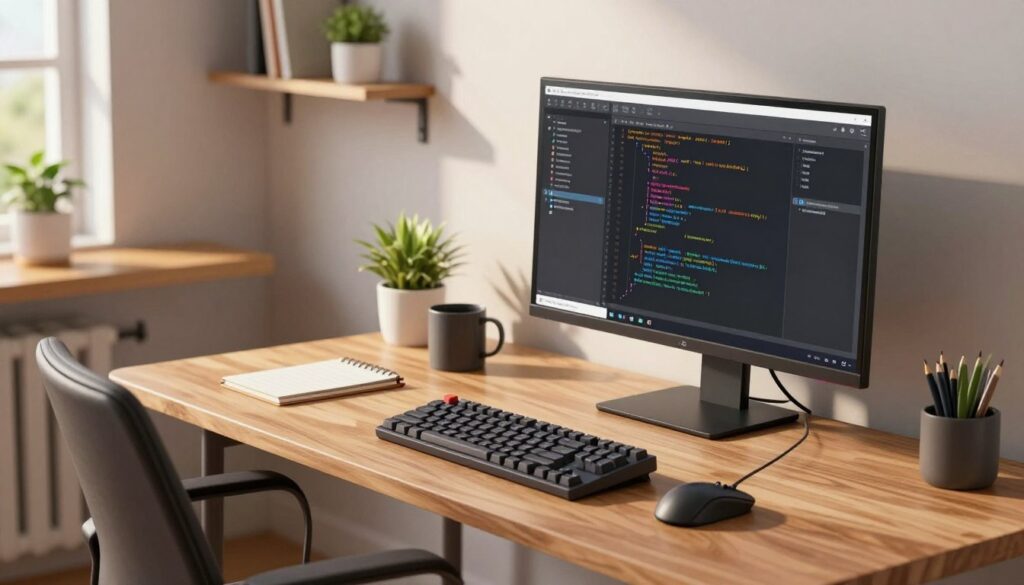
Portrait-capable monitors or arms increase visible lines of code. A Friska standing desk and an adjustable chair keep posture steady and let developers switch positions.
- Use wireless peripherals and a single USB-C hub to keep the desk uncluttered.
- Keep the wall behind the monitor clean to reduce visual noise.
- Adopt a single-cable docking flow for fast transitions between home and office.
| Option | Best for | Result |
|---|---|---|
| MacBook Pro | Mobility & macOS testing | Flexible, portable setup |
| M1 Mac Mini + PD3220U | Dedicated home desk | Quiet, high-quality display |
| Portrait monitor arm | Reading long files | More lines visible, less scrolling |
For layout ideas that keep the desk purposeful, see a compact desk plan that fits small spaces and focused work.
Essential Developer Tools that Reduce Friction
Thoughtful software choices keep attention on tasks, not configuration.
Editor and plugins: Choose Visual Studio Code for sensible defaults and fast onboarding. VS Code minimizes setup time and avoids endless tweaks. Add a few focused extensions and a recommended theme to stay productive.
Browser and dev essentials
Use Firefox as the primary browser with only essential extensions: uBlock Origin, Bitwarden, React DevTools, and Grammarly. This keeps the browser fast and predictable for debugging and code review.
Notes, credentials, and small utilities
Separate note types by intent: Obsidian for Markdown and local-first archives; Notion for structured plans; Apple Notes for quick capture. Bitwarden centralizes credentials on the free plan and reduces friction at the desk.
APIs, databases, and the terminal
Insomnia speeds REST and GraphQL tests. Postbird offers a lightweight Postgres GUI. Prefer the native Terminal with Homebrew and NVM—this keeps the computer environment simple and durable.
| Category | Recommended | Benefit |
|---|---|---|
| Editor | Visual Studio Code | Fast defaults, low configuration |
| Browser | Firefox + core extensions | Stable, predictable dev tools |
| Notes & Auth | Obsidian, Notion, Apple Notes, Bitwarden | Clear intent, secure credentials |
| Backend tools | Insomnia, Postbird, Terminal + Homebrew/NVM | Quick API checks, simple DB tasks |
Design a Workspace with Intent: Desk, Space, Storage, and Lighting
A purposeful desk makes it easy to start coding without hunting for tools.
Start with the desk surface: route power and data under the desktop, mount a cable tray, and use short right-angled cables. These small choices keep the setup visually quiet and speed transitions in a busy home office.
Cable flow, peripherals, and wall storage
Wireless peripherals reduce snags and simplify cleaning. When wires are necessary, use a single under-desk power strip and labeled ties to preserve order in limited space.
Use the wall as vertical storage with shelves or a metal pegboard—hang headphones, stow spare cables, and mount small shelves for microphones. This frees the desk surface and keeps essentials within reach.
Lighting, chair, and cohesive design
Lighting shapes attention: a screen bar or a dimmable lamp offers even, glare-free illumination to reduce eye strain during long coding sessions.
Choose an ergonomic chair with adjustable lumbar support and pair it with a standing desk that has built-in cable management. Keep the office aesthetic coherent—repeat two or three materials or colors so the workspace feels intentional rather than busy.
“Everything has a home” — a simple rule that sustains calm when a lot is happening.
For a practical way to organize and maintain order, see this concise guide on why organization matters: clear workspace routines.
Minimalist Dev Setups: Real-World Configurations and Inspiration
Practical layout decisions—where a display sits, how a chair adjusts, and what lives on the wall—define a productive station.
For monitors, pick an ultrawide for a seamless canvas or a dual arrangement on arms to mix portrait and landscape. An ultrawide reduces bezels; dual arms give flexible layouts for reading long files and testing UI.
A single work-and-play station can do both jobs. A BenQ PD3220U 4K display offers color accuracy for editing and crisp text for coding. Pair it with a Friska standing desk and soft lighting for evening sessions.
Keep gaming elements restrained: tone down RGB, add a screen bar, and choose a quiet or liquid-cooled case. Mount a monitor or PC to the wall to clear desk space and make room for notes and input devices.
- Headphones on a pegboard arm save surface clutter.
- Oakywood shelves and docks raise perceived quality and organization.
- Adjust the chair and a warm light preset to move from intense focus to creative review quickly.
| Configuration | Best for | Recommended gear |
|---|---|---|
| Ultrawide | Seamless multi-window work | Single ultrawide monitor, screen bar |
| Dual on arms | Flexible portrait/landscape mix | Two monitors with adjustable arms, pegboard storage |
| Work-and-play | Coding + content editing | BenQ PD3220U, Friska desk, quiet case |
compact web development example offers a concise reference for building a clean, fast station in small home office spaces.
Make It Stick: Daily Routines, Time Control, and Task Flow
Routines turn a good workspace into a reliable engine for focused output.
Start the day between 7–9 a.m. with a short warm-up: review top priorities, open Things 3, and mark one high-impact task. Reserve meetings before lunch and save deep, creative work for the later block.
Work in 60–120 minute deep windows, then take 5–10 minute breaks. Stand, stretch, and hydrate to keep energy steady. These simple pauses protect momentum and extend productive times.
Task management stack and habits
Use Things 3 for quick capture and daily lists; sync keeps tasks visible across devices. Use Notion for plans and roadmaps, and Apple Notes as a single rapid inbox for fleeting ideas.
- Apply focus modes and limit Slack notifications to reduce interruptions.
- Keep a nightly reset: clear the desk so the next morning starts fast.
- Alternate sitting and standing; adjust lighting as daylight shifts for home office longevity.
| Block | Typical use | Result |
|---|---|---|
| Morning | Priority tasks | Fast wins, clear direction |
| Midday | Meetings & collaboration | Focused synch, fewer context switches |
| Afternoon | Content and review | Quiet deep work before wrap |
“One setup, one rhythm, a few automation rules—small changes scale discipline.”
Conclusion
A clear plan for gear and routines turns an ordinary room into a reliable home office.
Keep one cohesive desk baseline — whether it centers on a MacBook Pro, a compact computer, or a laptop docked to a 4K monitor. A standing desk and an ergonomic chair lengthen focus and comfort.
Store extras out of sight: drawers, a pegboard on the wall, or hidden trays keep the workspace calm. Place headphones nearby and use a single-cable dock to save a lot time switching contexts.
This guide closes with one idea: small, consistent choices in design, storage, and tools (VS Code, Firefox, Bitwarden, Obsidian/Notion) compound into workspaces that help you ship and learn more reliably.
FAQ
What setup helps a developer stay in the coding flow?
A streamlined workstation with a reliable laptop like a MacBook Pro or a compact desktop such as an M1 Mac Mini, a single high-quality 4K monitor or an ultrawide, an ergonomic chair, and good lighting supports sustained focus. Keep peripherals wireless, manage cables, and limit on-desk items to essentials—keyboard, mouse, headphones, and a notebook—so context switches stay minimal and interruptions drop.
Why does a minimalist workspace improve concentration?
Reducing visual clutter lowers cognitive load and decision fatigue. Studies show clean environments improve attention and task persistence. Practically, fewer objects means fewer distractions and faster transitions between tasks, which helps developers enter and maintain deep work states more reliably.
How do aesthetics translate into better output?
A clean design signals order—this cues the brain to prioritize. Simple, consistent layouts and neutral palettes reduce sensory noise. When tools are curated and organized, developers spend less time hunting for files or switching apps and more time solving problems, increasing both speed and quality of work.
When should one choose a MacBook Pro vs. an M1 Mac Mini?
Choose a MacBook Pro for mobility, frequent remote work, and on-the-go demos. Pick an M1 Mac Mini for a stationary home office that prioritizes cost-efficiency and expandability with external monitors and peripherals. Match CPU, RAM, and storage to project needs—compile-heavy work benefits from more RAM and faster chips.
What display and ergonomic choices make the biggest difference?
A 4K monitor with accurate color and adjustable height improves visual clarity and posture. Consider portrait mode for reading long files or documentation. Pair with a height-adjustable standing desk and an ergonomic chair to reduce strain; arm-mounted monitors free desk space and support natural head movement.
Which editor and plugins minimize friction for developers?
Visual Studio Code is a common choice for its speed and ecosystem. Start with focused extensions: a linting tool, a formatter, Git integration, and a productivity plugin that hides nonessential UI. Keep configurations lean—avoid too many plugins that slow startup or create noise.
What browser and extensions are recommended for dev work?
Use Firefox or Chrome depending on your testing needs. Add uBlock Origin to block distractions, React DevTools for component debugging, and language aides like Grammarly for documentation. Limit open tabs and use profiles or containers to separate work from personal browsing.
Which note-taking and credential tools reduce friction?
For notes and knowledge, Obsidian excels with local-first, linked notes; Notion fits team docs and templates; Apple Notes is fast for quick captures. For passwords and secrets, Bitwarden offers secure vaulting and browser integration. Choose one primary tool for each purpose to avoid fragmentation.
What API and database tools streamline testing?
Insomnia or Postman handle API requests cleanly. For Postgres, use a dedicated GUI like TablePlus or pgAdmin and keep a native Terminal workflow for quick psql queries. Rely on scripts and Docker containers to reproduce environments consistently.
How should cable management and peripherals be handled?
Use under-desk trays, adhesive clips, and a single docking hub to reduce visible cables. Favor wireless keyboard and mouse to declutter the surface. Wall-mounted shelves or pegboards organize gear and free desk real estate while keeping essentials within reach.
Single ultrawide or dual monitors—what’s better?
Ultrawide monitors offer seamless horizontal space, ideal for side-by-side code and terminal views. Dual monitors with adjustable arms provide flexible positioning and dedicated screens for communication or design work. Choose based on workflow—continuous timelines favor ultrawide; discrete tasks favor dual setups.
How can a workspace support both coding and content creation?
Designate zones: a primary coding station with ergonomic focus, and a small secondary area for camera, microphone, or creative tools. Use quick-switch profiles or a KVM to move between tasks without reconfiguring hardware. Keep lighting and background elements neutral to suit both activities.
What daily routines help sustain productivity in a minimalist workspace?
Start with a short planning session: define one deep-work block, then two focused intervals with breaks. Use time-blocking and a task manager such as Things 3 or a simple kanban. Silence notifications, enable Slack focus modes, and commit to ritualized transitions—stand, hydrate, and reset the desk between sessions.
Which task-management stack reduces context switching?
Combine a single task app (Things 3 or Todoist) with project notes in Obsidian or Notion and time tracking via simple timers. Prioritize a small backlog, keep work-in-progress low, and adopt clear next-action items. This stack reduces mental overhead and speeds decision-making.
How do you maintain these habits long-term?
Make incremental changes: declutter one zone per week, set a consistent start time, and review tools quarterly. Automate repetitive tasks, archive inactive files, and iterate on your setup. Small, sustained improvements compound into a workspace that supports deep work and creative problem solving.